ALBUM ART
Recreating Daft Punk's "Homework" in CSS
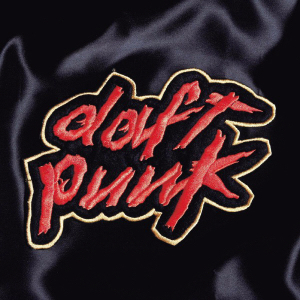
I found a website where you could download the font used for the daft punk logo. I immediately downloaded it and began trying to recreate the cover art from their first album “Homework” using just html and css.
It’s a fairly simple design, just some reddish text with two outlines, one black, one yellow. Sure, webkit-text-stroke only lets you put one outline around your text, and who cares if I have to force the stacked text to have one stacking context. This is nothing pseudo-elements and a z-index can’t solve.
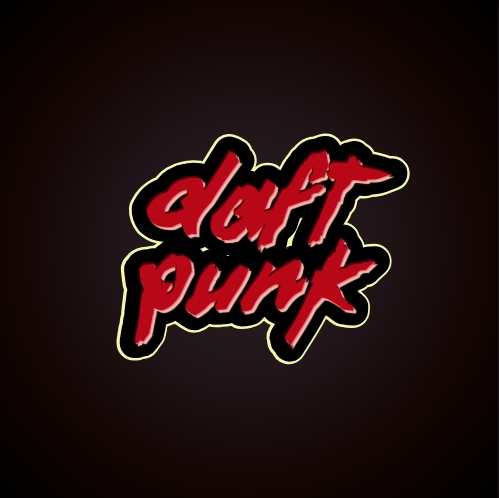
I was so delighted when my first attempt came out looking pretty close, that I wrote up a blog post and smuggly included all my code.
Then, while tidying up my website… I noticed it. Chrome butchered my daft punk outlines! But whatever it’s fine, it’s just Chrome.
It's not fine!
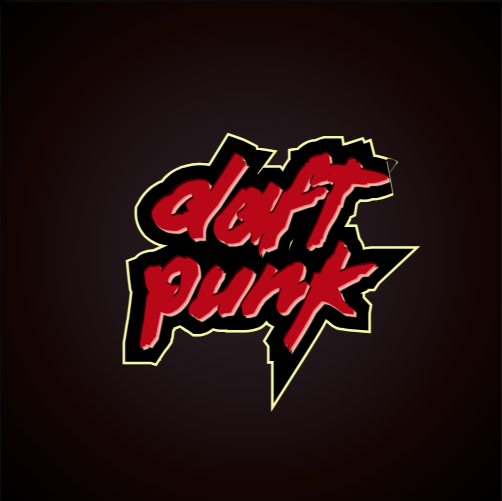
It looks like some poor left handed kid tried to make due with a dull pair or right-handed scissors
I like to work on my websites in firefox, usually I put them in chrome just to check if everything is in order, but for some reason I plumb forgot to see if my daft punk logo looked the same on chrome.
Turns out webkit-text-stroke is handled a bit differently between the two web browsers. Firefox smooths things out quite a bit more. Normally this isn’t all that noticeable, but with spikier fonts it becomes very obvious. And I absolutely refuse to use text shadows to create text outlines (i tried, it looked even worse).
So I give up, you can’t make the daft punk “homework” artwork with just some simple CSS. And there go my dreams of making all my H1's look like the robots’ first album.
But atleast I learned how to make multiple text outlines… so long as the font isn’t too jagged.
Making multiple text outlines, so long as the font isn't too jagged
If I wanted perfection in my title stylings I could lovingly design them in Inkscape, but I don’t want perfect, I want something easy to replicate, I want good enough. As hinted at before, the trick to making multiple outlines on text is to use a ::before and ::after pseudo-element.
You just have to make sure to set the content property of your pseudo-elements to whatever text you’re trying to outline. So if I have an H4 tag set to “ROCK!!”, my pseudo-element’s content should also equal “ROCK!!”.
ROCK!!
ROBOT
ROCK!!
Because I have multiple heading tags in my example I chose to use the data-title attribute in my html to auto populate the content property in my CSS. Then it is just a matter of placing the pseudo-elements relative to their corresponding html tag using position: absolute and setting their position and z-index accordingly.
<h4 class="word1" data-title="ROCK!!">ROCK!!</h4>
<h4 class ="word2" data-title="ROBOT">ROBOT</h4>
<h4 class ="word3" data-title="ROCK!!">ROCK!!</h4>h4 {
position: relative;
font-family: var(--font-pumpkin);
font-size: clamp(3rem, 20cqi, 7rem);
line-height: 0.8;
color: var(--clr-background);
text-transform: uppercase;
-webkit-text-stroke: 3px var(--accent-pink);
paint-order: stroke;
overflow-wrap: anywhere;
}
/*black outline*/
.word1::before,
.word2::before,
.word3::before {
content: attr(data-title);
position: absolute;
color: var(--clr-background);
-webkit-text-stroke: 0.3em var(--clr-background);
z-index: -10;
}
/*light pink outline*/
.word1::after,
.word2::after,
.word3::after {
content: attr(data-title);
position: absolute;
color: var(--bg-pink);
-webkit-text-stroke: 0.4em var(--bg-pink);
left: 0;
top: 0;
overflow-wrap: anywhere;
z-index: -20;
}